Thursday, November 19, 2009

iPhone User Experience + UIWebView

Beta and UX testing has given me a couple things to work on:
  • Bugs
  • UX
  • More bugs
Ok, the bugs are mostly found by me. The UX issues are things that people have mentioned when the use the app (UX=User Experience).

The first thing I do when I show someone the app for the first time is ask them to tell me the first things that come to mind about the usability. So far I've gotten 3 biggies that are worth investigating:
  1. Live feeds of information pertaining to the app so the user can drop that information into a tweet instantly without having to look it up or type it. Good one and something I will consider for a future release since sourcing the life feeds I would need will take time to build since I have not found anything with the information that the user thought would be most valuable.
  2. Customized tweet strings or tweet templates we will call it. Great idea and good for a future release.
  3. Last but not least; one tester pointed out I should really make signup for a Twitter account as easy as possible for a user that does not have an account. Good point, this should go into release 1 I think.
So, I thought let's add a UIWebView for the Twitter signup page. Adding the UIWebView was easy so I dropped it in immediately so the user can navigate to the Twitter Signup page within my app and quickly create an account.

Now, if I could just nail down the last of those bugs. Currently I have some unhappy plists which I am using to store cached webservice data between runs of the app. Off to track those down now.

Thursday, October 15, 2009

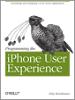
My Review of Programming the iPhone User Experience

Originally submitted at O'Reilly

This practical book provides you with a hands-on, example-driven tour of Apple's user interface toolkit, UIKit, and some common design patterns for creating gestural interfaces and multi-touch navigation for the iPhone and iPod Touch. You'll learn how to build applications with Apple's ...


Lief Motif: Think Design First

By mthistle from Ottawa, ON, Canada on 10/15/2009


4out of 5

Pros: Good for beginners, Accurate, Easy to understand, Helpful examples

Cons: Lots of beginner info

Best Uses: Student, Intermediate, Novice

Describe Yourself: Designer, Maker, Developer

Summary of my favorite chapters in order of most useful:

Chapter 9: UX Anti-Patterns - the first chapter I read and the best one for a lot of good tips on how not to develop your UX. Every iPhone developer should read this chapter. I will reread this chapter occasionally to keep UX issues fresh in my mind.
Chapter 5: Cooperative Single-Tasking - for someone coming from an enterprise and server applications UNIX background, this chapter was an excellent discussion on how the iPhone environment is akin to a web based environment where each app is like a web-page. You can even (as most devs would know) pass control between apps using the iPhone SDK's Custom URLs. This also had a good discussion on launching quickly, handling standard interruptions, etc. I will revisit this chapter.
Chapter 8: Progressive Enhancement - This is a good overview of some of the sexier features you might want to drop into an app. Sound, location awareness, networking, etc. The coverage raises lots of questions for you to think about and has some good lists of things to think about like how will your app handle a lack of location awareness if the user has turned off location awareness or says no to the prompt to use location awareness in your app? How will you handle sound and sound effects in your app if you use them? How will you deal with incoming calls and sound? Lots of good things to think about if you touch on any of these features in your app.

(legalese)

Wednesday, October 7, 2009

Book Report: Programming the iPhone User Experience

Publisher: O'Reilly
Author: Toby Boudreaux

Title: Programming the iPhone User Experience
Tagline: Developing and Designing Cocoa Touch Applications

Overall
  • The book had a nice lief motif throughout which was to think about design first. I felt the discussions framed in this way were very helpful in eliciting thought about how can I do better with my app design? Have I thought various aspects of the design through enough? Or, I have not thought of that, what should I be doing about that aspect in my app?
  • As someone that has read most of Apple's iPhone introduction guides for programmers, the book could have been shorter as I felt there was a lot of rehashing of the basics. Like application templates and controls. I am sure that if I had done anything outside of the basic touch actions then I would have covered most of the touch chapter as well. That said, if you are new to iPhone programming or you have not read the programming intro docs from Apple, then by all means this is a short book with lots of overview. You will want more details than contained here but this will give you a good overview of the iPhone features you'll want to think about while designing your app.
  • The best chapter by far and the reason to buy this book in my opinion is chapter 9 on UX Anti-Patterns. Once you read this (and if you have used a reasonable number of apps) you will be saying, ya that is a bad design. If you've wondered what it was about such and such an app that made it not feel right then this chapter probably has a clue. Read this chapter to keep in mind UX designs to avoid without great thought.

Chapters In Order of Most Interest to Me
  • Chapter 9: UX Anti-Patterns - the first chapter I read and the best one for a lot of good tips on how not to develop your UX. Every iPhone developer should read this chapter. I will reread this chapter occasionally to keep UX issues fresh in my mind.
  • Chapter 5: Cooperative Single-Tasking - for someone coming from an enterprise and server applications UNIX background, this chapter was an excellent discussion on how the iPhone environment is akin to a web based environment where each app is like a web-page. You can even (as most devs would know) pass control between apps using the iPhone SDK's Custom URLs. This also had a good discussion on launching quickly, handling standard interruptions, etc. I will revisit this chapter.
  • Chapter 8: Progressive Enhancement - This is a good overview of some of the sexier features you might want to drop into an app. Sound, location awareness, networking, etc. The coverage raises lots of questions for you to think about and has some good lists of things to think about like how will your app handle a lack of location awareness if the user has turned off location awareness or says no to the prompt to use location awareness in your app? How will you handle sound and sound effects in your app if you use them? How will you deal with incoming calls and sound? Lots of good things to think about if you touch on any of these features in your app.
  • Chapter 4: Choosing an Application Template - this was a bit fluffy (see next point about things covered in the basic iPhone dev docs) but it did have a good discussion around identifying a problem to solve, thinking about how to solve it, and keeping your app focused. If your app's feature list and views are getting a little unwieldy then think about breaking it into different apps that are focused on solving only one of those features well. I thought this was a good idea and with the use of Custom URLs you could design a series of apps that work together collaboratively but would allow the user to purchase only the pieces they require. There are already devs out there that are opening their Custom URLs to others such as BirdFeed's Custom URLs from developer Buzz Andersen.
  • Chapter 6: Touch Patterns - good discussion about how to handle touches, touch accuracy (which lots of apps ignore with tiny buttons that are almost impossible to click), and a good overview of how to interact with touchable views. Worth reading for the discussion about view touch accuracy alone.
  • Chapter 7: Interaction Patterns and Controls - I found this rehashed a lot of the iPhone developer documents again so it would be good for beginners but if you have touched most of the controls in here then maybe the patterns will be of interest but the controls discussion was skip-able.
  • Chapter 1 to Chapter 3 had too much fluff which was good for those that have not read the Apple iPhone development documents but in general if you have read the iPhone Application Guide and the Mobile HIG then you can skip these.
Ok, so the FTC just passed laws about disclosing how a reviewer/blogger/etc benefited or whatever for posting a review. So how did I benefit? Well first, the book was free to me. The CocoaHeads group I belong too has an O'Reilly User Group membership. We get free books to review as a group every so often. This book came in and I got to review it for the group. I had the book for a month and it goes back to the group tomorrow night when someone else gets to take it and review it for a month.

Would I buy the book? Yes, I found I ran out of time to implement some of the code ideas in the book and I'd like to take some time to sit down and work through the samples. First I want to go and read Coders at Work though, so that will be the next purchase.

If you want to join in our monthly discussions and are an iPhone Dev in Ottawa, Canada then check out our CocoaHeads meetings.

Wednesday, September 23, 2009

iPhone Memory Management Tips

Found this great article on iPhone Memory Management. http://kosmaczewski.net/2009/01/28/10-iphone-memory-management-tips/

Worth a read and something I keep handy to refresh myself occasionally.

MT

Thursday, September 17, 2009

What happened?

Well, I fell off the face of the earth. Ok, not literally but my free time has all been sunk into my iPhone App project the past 2 months.

Am I running? Barely ever, as in never.

Am I riding? Nope.

What am I doing? Writing code, setting up a business to track expenses/earnings, setting up a web site, installing software to help me write software, reading about writing software, learning new software languages, and the list goes on.

I made the decision to put all my time into this App about 2 months ago when I figured it would be about 2 months. That time has come and gone and I have had to do a lot of things I never expected to move this project along. It has all been fun and a learning experience but it has taken a lot of energy and time.

I need to bring some balance back into my life and spend a little less time working on the App and a little more on everything else. I took a break tonight as you can probably tell and it has been good. I still read a ton but not thinking about the App has been good.

I call it the App (maybe it should be The App) since it is such a huge thing in my life right now. I miss running though and I want to get back. Running makes me push my physical limitations and writing this App is pushing my technical limitations. Some day soon though, the sneakers need some loving.

Wednesday, August 12, 2009

Getting Started With iPhone Programming

A couple friends have asked about iPhone programming since I yammer on about it all the time. They were wondering if they could get a taste for what the language (Objective-C), frameworks (iPhone SDK) and API (Cocoa Touch) would be like to use. So here is a short answer to that:

If you are a C/C++ programmer, you should have no trouble moving to Objective-C once you understand the messaging scheme they use. Print out a copy and review the definitive guide to Objective-C 2.0 (latest version). I've found that reading lots of code examples (Apple's and those supplied by others online) has helped me understand Objective-C better.

I think it would be helpful to start digging into some of the general documentation regarding the fundamental design patterns used throughout Cocoa and iPhone programming. Cocoa Touch being the OO API for the iPhone and Touch.

Wiki might be a good start for an overview (http://en.wikipedia.org/wiki/Cocoa_(API)) and then I would definitely dive into the getting started docs on http://developer.apple.com/iphone/ Starting with the Cocoa Fundamentals Guide and moving onward from there will give you a good understanding of how applications run on the iPhone. Many of the Apple guides have references to other prerequisite whitepapers, tutorials, and guides to read first or to continue learning in a particular area. These have been a ton of help to get me immersed in iPhone development.

As well, I would say take a look at the Matt Gemmell's iPhone Development Emergency Guide

Hope that helps you get up and running.